

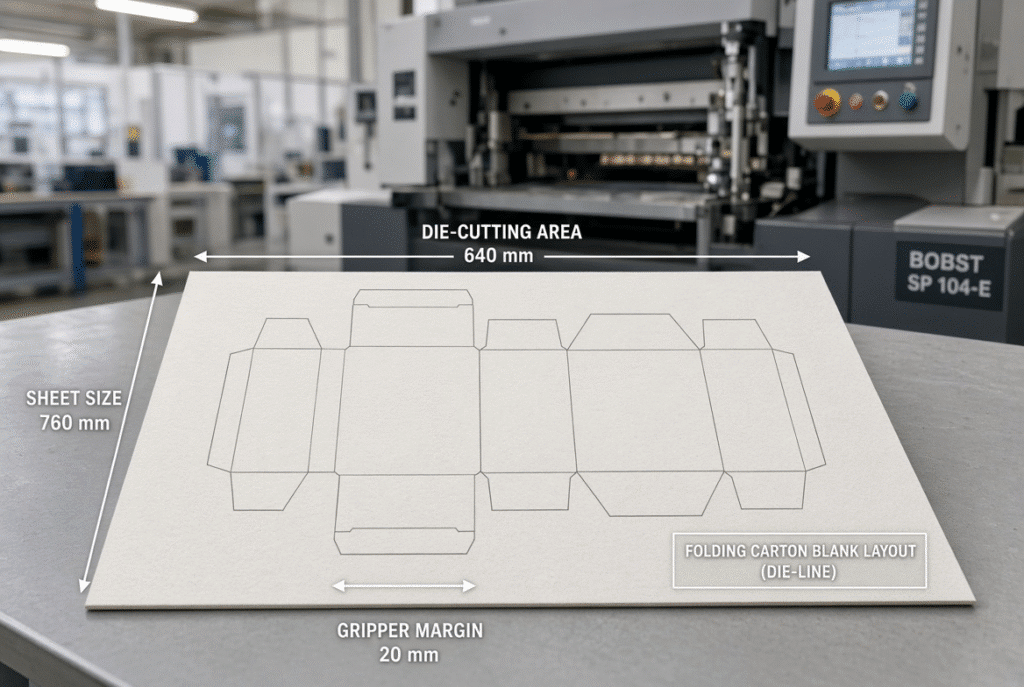
The first question to ask in determining the size of the automatic die cutter required is not what catalogue number, but the actual production envelope. The right machine is the one which can in fact fit your biggest and smallest regular jobs, the flat blank layout, material behaviour and realistic future products, and whose maximum sheet size, maximum die-cutting area and required gripper margin match these requirements. Even if the sheet is able to enter the feeder, if the die layout does not provide for the registration and/or practical clearance of the gripper edge, it will be unusable.
This guide explains the three essential dimensions, demonstrates how they are applied to the sheet, and provides a practical solution for packaging plants to test fit prior to purchasing an automatic platen die-cutting machine in 800 mm class or larger.
The Three Dimensions Buyers Must Understand
The relationships between the sheet size, die-cutting size and die gripper margin are not interchangeable. Purchasing them as a single unit, the buyer may find out only after the machine is being installed and the first production trial fails.
Maximum Sheet Size
Maximum sheet size is the maximum size for the specified configuration of the feeder, transport path and machine frame. For the D800S, that figure is 800 × 620 mm. The dimension does not guarantee stable feeding through all thicknesses of the board, warp condition and running speed. Suction of feeder and side guides and delivery behaviour need to be confirmed using the actual material.
Minimum Sheet Size
The minimum sheet size is important as well. Small carton or sleeve types of plants, inserts or short run promotional packs require reliability at the lower end of the range. The D800S is listed at 300 × 180 mm. An oversized machine may be able to accept these sheets, but they will likely not register well, and double-sheet detection and delivery pile quality may be impacted. Always do the smallest profitable job, not the largest.
Maximum Die-Cutting Size
Maximum die-cutting size is the largest operable area of the steel-rule die. On the D800S this is given as 800 × 615 mm. The figure is also smaller than the maximum sheet size, as there is a need for space to grip the sheet, register and provide clearance for the structure. The outer edge of the die is not available for product – the die layout has to fit within this usable area.
Gripper Margin
The sheet margin that is being held or controlled by the sheet transfer mechanism of the machine is called gripper margin. It is not typically available for the entire product design. The D800S is supposed to have a minimum mouth size of 8 mm. As long as the engineering team hasn’t determined a functional gripper margin for a specific configuration, consider the two terms related but not the same. The margin has a direct impact on the number of blanks that can be nested, the sheet orientation and the amount of edge waste that cannot be avoided.
Why Maximum Sheet Size and Maximum Die-Cutting Size Are Different
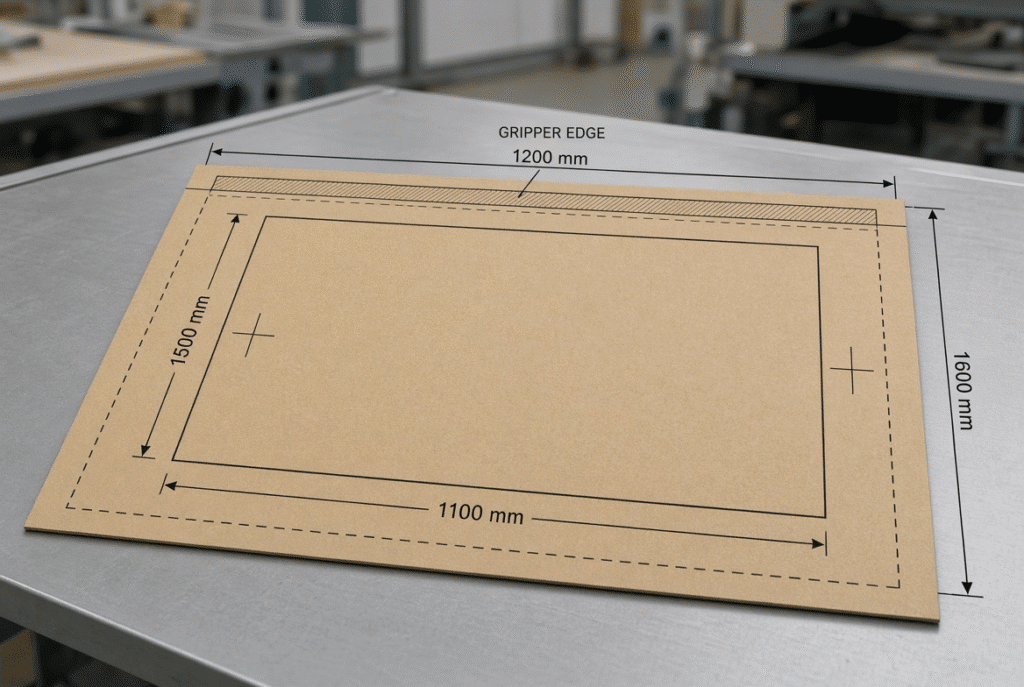
With gripper, front lay, side lay and tooling clearances, the die-cutting area may be only 800 × 615 mm or less on the sheet of 800 × 620 mm that goes into the machine. This is not a catalogue mistake, but the space the machine requires to carry and register the sheet reliably.
Sheet Area Is Not Automatically Usable Cutting Area
The whole sheet may not be used for product. The edge of the gripper must not be caught and the position of registration is to be accessible and the working margin of the die board must be practical. Setting up all the way out on the “outside of the sheet” is almost always a wasteful unstable setup.
Orientation Changes the Result
Just 90-degree rotation of a blank layout can make an impossible job possible, or a possible one impossible. Other factors that are influenced by the orientation are the grain direction on a paperboard, the flute direction on the corrugated, the print-to-cut registration and the behaviour of waste from the down stream/up stream folding. Either direction may be tested prior to finalizing the machine size.
Tooling and Registration Require Practical Clearance
They all occupy valuable room, such as steel-rule dies, creasing rules, make-ready sheets, and chase dimensions. Theoretically, a layout that touches the largest cut boundary will not allow for any material variations or rule deflection or even a slight adjustment in the registration. Do not design to the edge as this is the point to confirm with the die maker and the machine supplier.
How to Calculate Whether Your Product Fits the Machine
Work from the completed flat blank to the final dimensions of the sheet and die. Always start with the “free” size of the carton.
Start with the Flat Product Layout
Measure the full unfolded blank (all panels, glue flaps, dust flaps, crease lines and cutting edges). If using corrugated work, give the direction of the flutes and any slotting and waste stripping needs.
Add Product Spacing and Waste Allowance
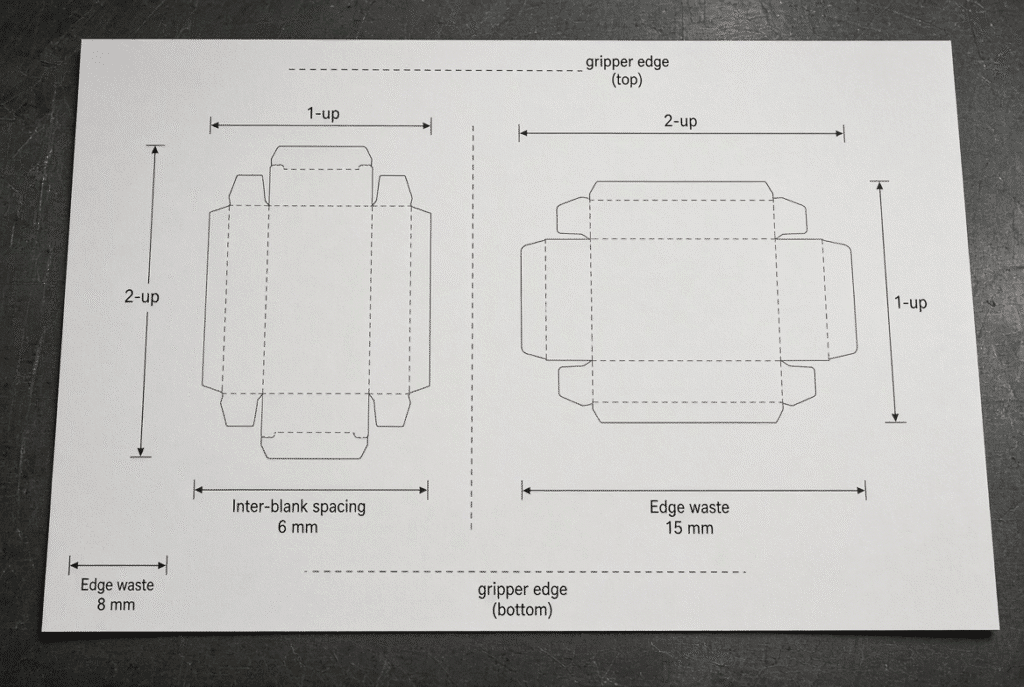
Multiple-up layouts require blank space between the blanks to cut the rules and to be able to separate the clean waste. There is also edge waste that is needed for transport and trimming. There is no standard spacing figure; it is dependent on the die design, thickness of board and machine configuration. Check the values with your die maker.
Reserve the Gripper and Registration Area
Place the layout so that the edge of the gripper and the front/side registration areas are clear. It is not a general rule of thumb, but rather the exact reserve is determined by the technical drawing of the machine.
Test Both Layout Directions
Calculate two blanks in both orientations. Generally, the trade-offs include number of ups, grain / flute direction, stiffness of the sheet, the orientation of the print, waste percentage, feeding stability / print folding performance. An apparent efficient layout on paper may not be accepted when the material is run.
Choosing the Right Machine Size for Folding Cartons
Match the machine with the largest job regularly and smallest job that makes money. If an order is large, it shouldn’t be the deciding factor for ordering if it’s only a few percent or less of the yearly volume.
Match Machine Size to Your Largest Regular Jobs
Ensure machine can manage the smallest profitable sheets, with stable feeding, registration and delivery. Use real board to test both ends of size range.
Consider Small Jobs and Minimum Sheet Control
Confirm that the machine can handle the smallest profitable sheets with stable feeding, registration and delivery. Test both ends of the size range with actual board.
Evaluate Creasing and Folding Requirements
All of these are filters, and dimensional fit is the first of them. Whether the carton will cleanly fold on the folder-gluer is dependent on the quality of the crease, direction of the grain, and pressure distribution of the board. If the print to die registration or crease performance is not maintainable on a machine that will be able to accept the blank, it may still be a bad choice. itable if crease performance or print-to-die registration cannot be maintained.
Choosing the Right Machine Size for Corrugated Packaging
Paperboard doesn’t have the same amount of variables that corrugated sheets do.
Board Thickness and Flute Structure
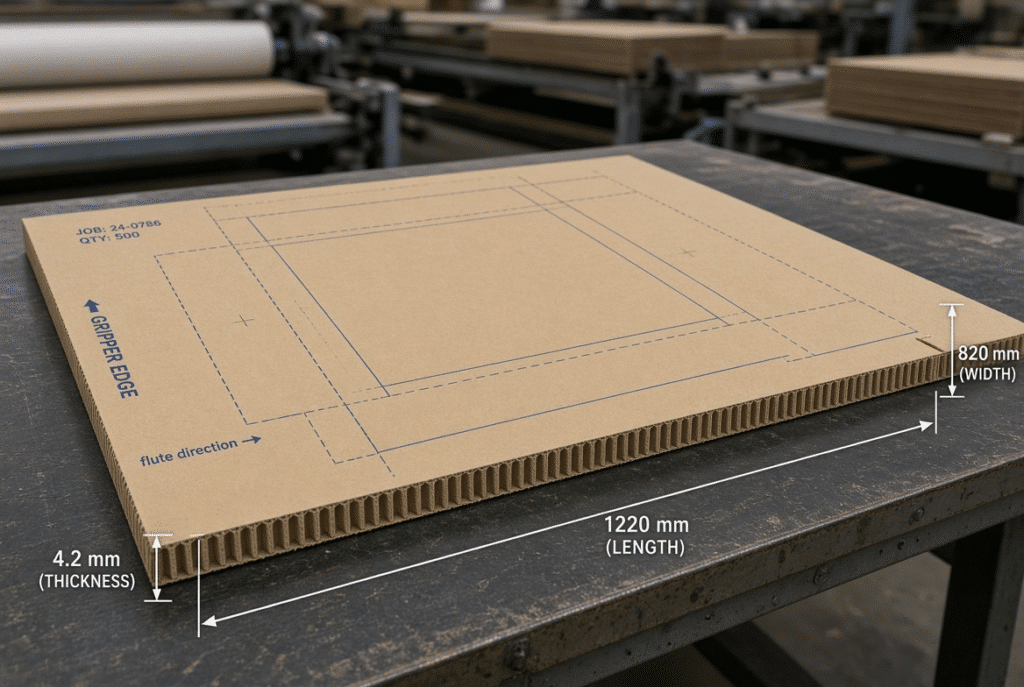
Higher or stiffer board changes affect feeding behaviour, tonnage required, response to creasing, and stability of the delivery pile. Always check the thickness and flutes supported, not from a catalogue, but with real samples.
Warp, Curl and Sheet Flatness
These warped or curled sheets can result in skew, double-sheet faults or registration drift even if the nominal dimensions are satisfactory. During any trial, assess the condition of the material and moisture and the design of the feeder.
Die-Cutting Area Versus Practical Corrugated Layout
Actual die cutting size is usually less than the nominal size due to slotting, waste removal and sheet support. Provide the actual blank drawing, material specification and the target speed to the supplier for confirmation.
Common Sizing Mistakes Buyers Should Avoid
Choosing by Maximum Sheet Size Alone
As long as there is a sheet that fits the feeder there might still be a lack of usable area for the die, gripper and registration. Always check product layout against the maximum die cutting area and technical drawing.
Ignoring Minimum Sheet Size
Feeder control and registration problems occur on most jobs because of the purchase of large sheets and failure to consider small products. Test the smallest profitable sheet.Test the smallest profitable sheet.
Designing to the Absolute Boundary
There is no room for set-up error or change in material when layouts are set to the maximum cutting size. Verify working margins.
Forgetting Material Behaviour
Feeding and cutting is more limited by stiffness, warp, moisture and surface friction than indicated by the drawing. Being dimensionally compatible does not mean that it is dimensionally stable.
Failing to Consider Future Products
Choose a machine capable of encompassing the realistic 3-5 year product range, but not oversized that increases the cost and floor space.
A Practical Machine-Size Comparison Framework
| Production Requirement | Machine Specification to Verify | Why It Matters |
| Largest regular sheet | Maximum sheet size | Ensures the core jobs can enter the machine |
| Smallest profitable sheet | Minimum sheet size | Protects feeder control and registration |
| Largest die layout | Maximum die-cutting size | Confirms the tooling actually fits |
| Gripper margin | Minimum mouth size / gripper specification | Determines usable layout and waste |
| Material thickness | Supported board / corrugated range | Affects pressure, feeding and creasing |
| Product type | Paperboard vs corrugated capability | Different handling and tooling needs |
| Typical number of ups | Layout efficiency within cutting area | Drives productivity and waste |
| Required speed | Rated production speed under real conditions | Catalogue speed is rarely achieved on every job |
| Changeover frequency | Make-ready and tooling change features | Impacts overall plant efficiency |
| Future product range | Growth margin in sheet and cutting size | Avoids premature machine replacement |
| Available floor space | Overall machine footprint and access | Installation and safety constraints |
| Trial requirements | Sample testing capability | Validates the real production envelope |
Only after actual job drawings and material samples are reviewed against these points, will they confirm the selection of the machine.
Questions to Ask the Machine Supplier
- What are the maximum and minimum sizes of a sheet with the proposed configuration?
- What is the largest possible area to be cut, and what is the gripper clearance already taken off?
- So what is “mouth size” or minimum gripper margin on this machine?
- What edge of the sheet is to be used for holding and registration?
- Is the smallest representative sheet possible able to run on the machine without speed fluctuations?
- What thickness of paperboard and corrugated have been tested?
- What happens to the machine if the sheets aren’t flat?What happens if the sheets are warped or curled?
- Is it possible for the supplier to test the actual layout of the die and tooling?
- What is the suggested edge clearance?
- Does any feeder/delivery/p pressure function need to be optional?
- Are the products planned for the future supported by the machine? v
Documents and Samples to Request
Ask for detailed machine layout drawing, sheet-size diagram, die-cutting-area drawing, gripper and registration specification, material compatibility range, installation drawing, sample test report, standard and optional configuration list and the standard vs optional configuration list. A written technical confirmation is better than word for word, “the sheet will fit.”
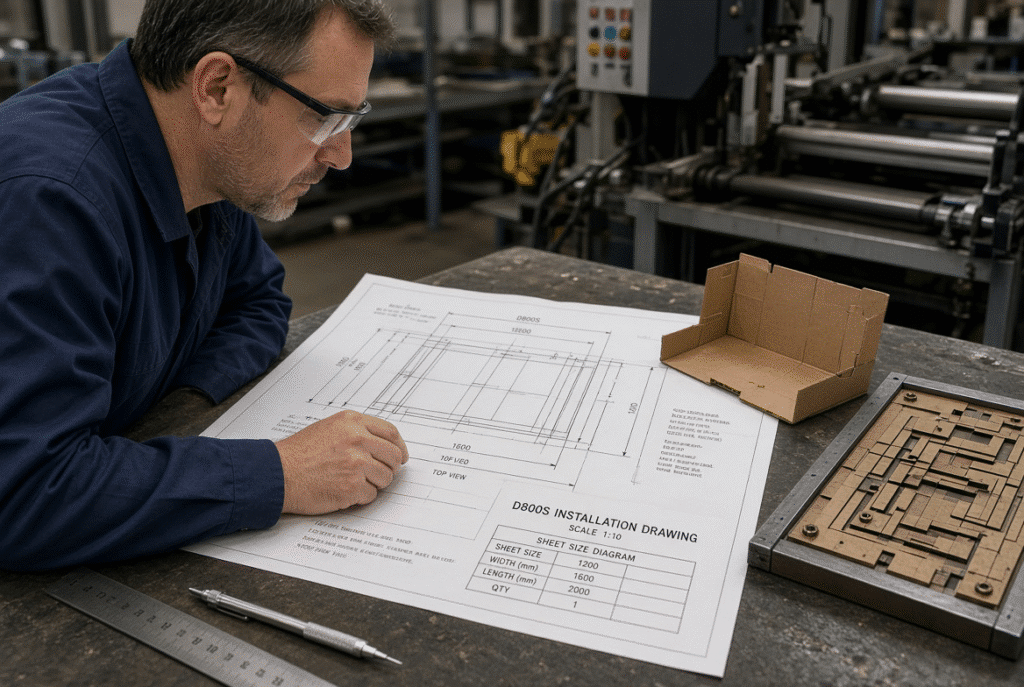
Using the D800S as a Sizing Example
The D800S is an 800 mm class automatic platen die-cutting machine that has the following confirmed values:
- Maximum sheet size: 800 × 620 mm
- Minimum sheet size: 300 × 180 mm
- Maximum die-cutting size: 800 × 615 mm
- Minimum size of the mouth: 8 mm.
The product layout must be carefully planned because an 800 × 620 mm sheet can be introduced into the machine, but the usable area for die cutting is 800 × 615 mm and the minimum mouth size is 8 mm. Not all sheets fit the maximum dimension and so cannot be used for die cutting to its full potential.
What These D800S Dimensions Suggest
The product layout must be carefully planned because an 800 × 620 mm sheet can be introduced into the machine, but the usable area for die cutting is 800 × 615 mm and the minimum mouth size is 8 mm. Not all sheets fit the maximum dimension and so cannot be used for die cutting to its full potential.
How to Confirm D800S Application Fit
Give the supplier maximum and minimum sheet size, flat blank drawings, material type and thickness, board samples, the number of ups required, the desired production speed, the number of creasing and perforation required, and installation considerations. The only thing that can be absolutely sure is a sample test with real tooling.
Final Checklist for Choosing an Automatic Die-Cutter Size
- Write down the name of the largest regular sheet and the smallest profitable sheet.
- Measure flat product layout (entire product).
- Determine gripper and registration needs.
- Look at both the vertical and horizontal format.
- Verify thickness, stiffness and grain or flute direction of material.
- Check the layout with regard to the maximum die cutting area.
- Test representative tooling and board samples.
- Check over the number of changes and volume of production.
- Check for installation room and access.
- Ask suppliers for written confirmation of all critical dimensions.
- Have realistic future product needs.
Final Guidance: Select for the Real Production Envelope
The size of an automatic die-cutter that is right for the plant is the smallest machine that safely and effectively fits the plant’s actual production envelope – sheet dimensions, die layout, gripper margin, material range, job mix and foreseeable growth. Undersizing leads to capacity and quality issues right off the bat; oversizing leads to increased capital expenses, floor space requirements and operating loss efficiency.
Once the layout drawings, board samples and technical confirmation all are in harmony, the size of the machine to be decided is simple. Compare the verified D800S specs with your own sheets and blanks – or call the application team with drawings and material info for configuration check prior to final purchase.