

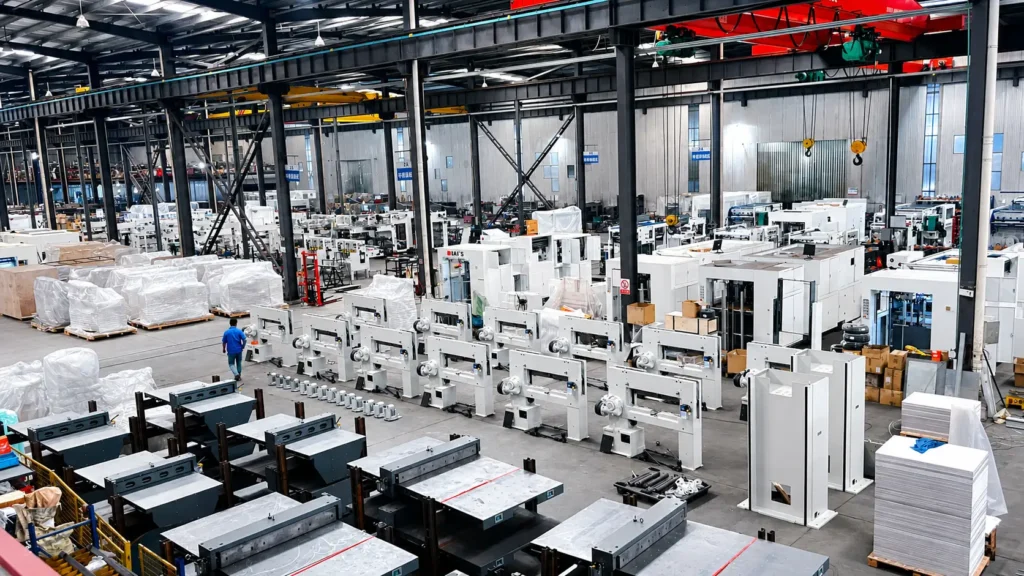
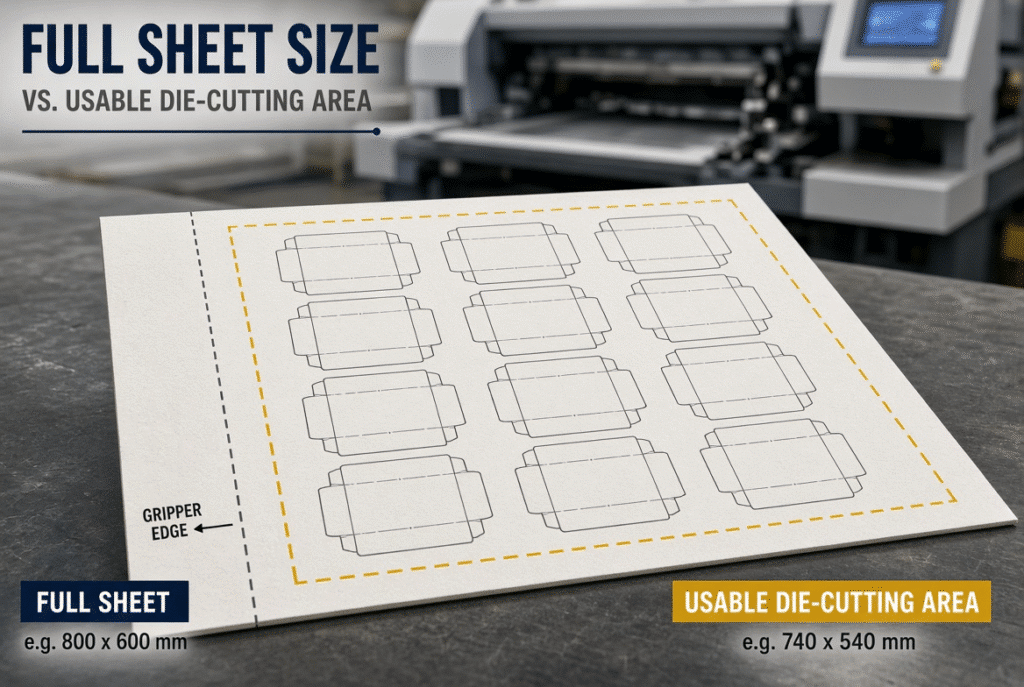
The maximum size sheet is the maximum sheet size the automatic die cutter can feed into and move the sheet through the machine. Maximum Die Cutting Size: The largest effective area that can be die cut, creased or perforated. The two numbers are not usually the same since the edge of the gripper, front/side registration, sheet control and tooling clearance must be accommodated in the machine. Although a sheet that fits the feeder can be used for the product layout, that is not the case for all sheets.
If the two figures are used interchangeably, the buyer could order a machine that is not capable of operating the desired die. Practical production envelope can only be established on a drawing, sample, and/or machine trial, not from catalogue numbers.
What Does Maximum Sheet Size Mean?
Maximum sheet size refers to the maximum envelope that the feeder, transport system, registration system, die cut system and delivery system are designed for in the given machine configuration. It includes the entire substrate, even the areas solely for grip, registration and edge control.
The Sheet Must Travel Through the Complete Machine
Each sheet shall be separated, retrieved, moved, registered, stored during the platen cycle and delivered. There are physical requirements for each stage. A sheet can easily feed into the feeder but can lead to subsequent issues if it is too stiff, warped, or poorly fed along the transport path.
Maximum Size Depends on Material and Configuration
Maximum published does not ensure the same performance of all paperboard/corrugated sheet offerings. The practical operation is influenced by the thickness, stiffness, warp, moisture, coating, and structure and friction of the flutes. Check if the maximum is for your material range and target production condition.
Maximum Sheet Size Includes Non-Product Areas
The full sheet includes the gripper edge, registration zones, edge waste and any other space required for stable movement. The following areas are not suitable for the full product layout. This is the first reason that the usable area of the die-cutting is less than the sheet itself.
What Does Maximum Die-Cutting Size Mean?
Maximum die cutting size is the largest effective area within which the die cutting, creasing and/or perforation tool can function based on the technical design of the machine. It is a specification for a tooling area or production area, not just an opening size or feeder limit.
The Die Must Fit the Machine’s Tooling Area
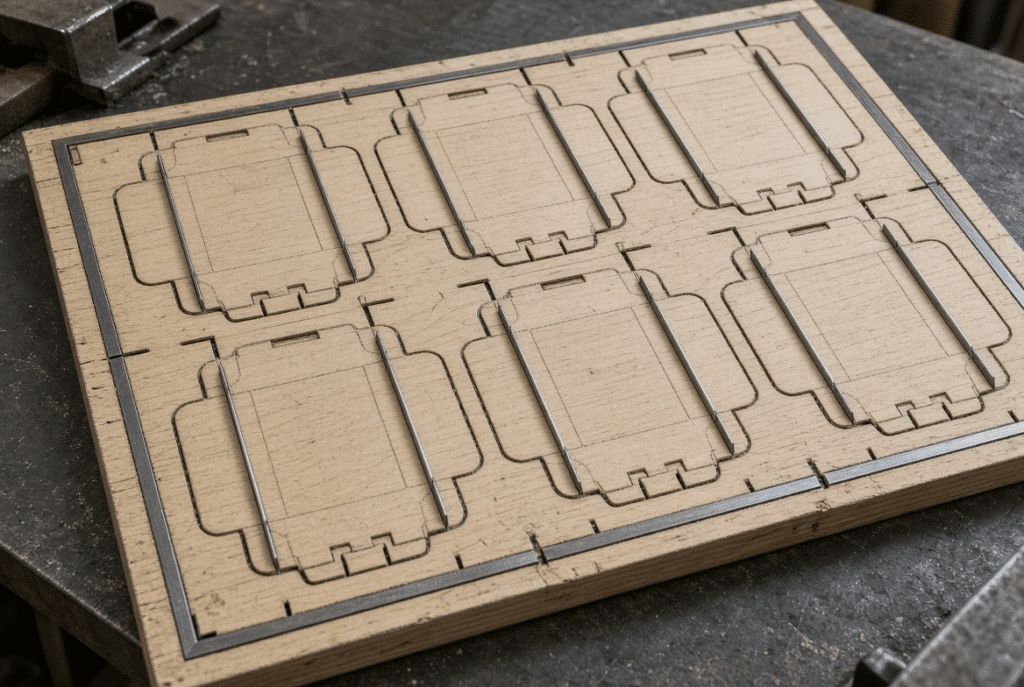
The die board, cutting rules, creasing rules, perforation rules and make-ready should be within the supported die area. Additional clearances are often required for mounting, locking and even pressure distribution. Ask for the official die-board and maximum cutting area drawing prior to finalizing layout.
The Product Layout Must Fit Inside the Die
The final carton or corrugated blank should be evaluated in the flat carton. Include all panels, glue flaps, tuck flaps, internal openings, creases, perforations, spacing between blanks and edge waste. A product which folds up nicely may need a much bigger die when unfolded.
Maximum Die Area Is Not Always Maximum Product Area
The tooling structure, edge clearances, and waste zones in the die may not be able to be utilized for all products. The true product arrangement will typically be less than the die-cutting nominal product amount. When considering the product layout, consider the die drawing too.
Why Maximum Sheet Size and Maximum Die-Cutting Size Differ
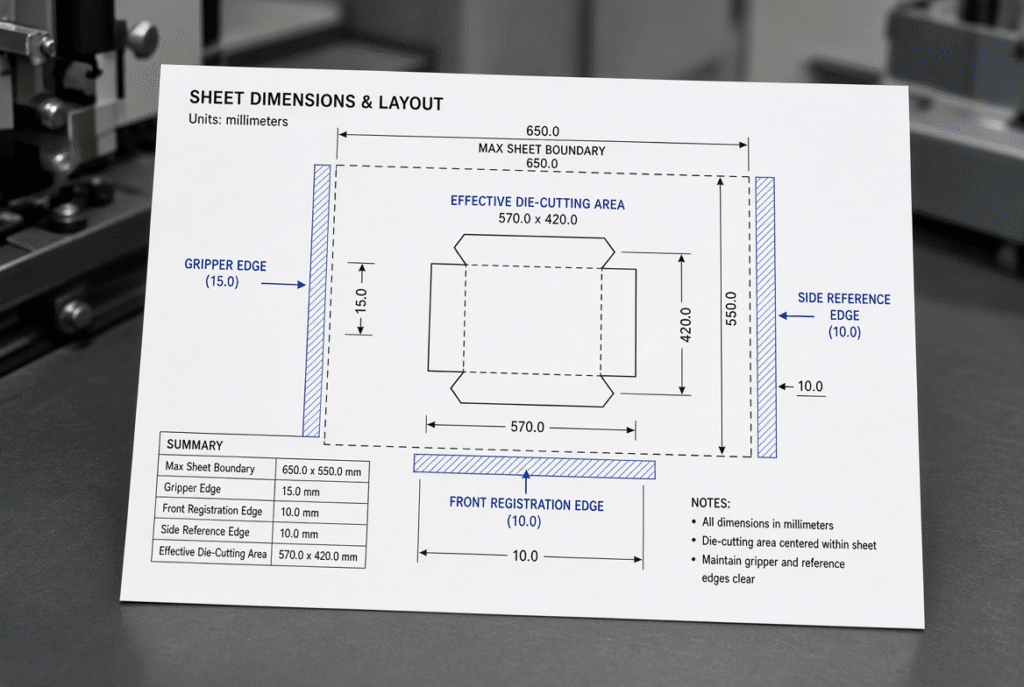
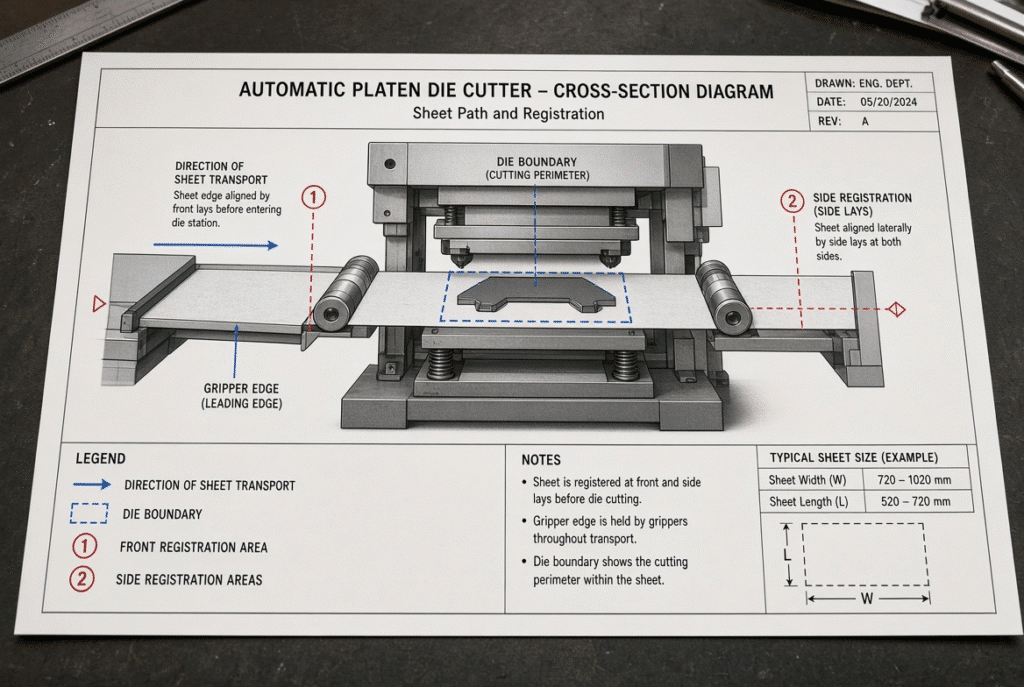
The difference is due to the fact that the machine has to move and position the sheet prior to and during the die-cutting cycle. It is machine- and configuration-dependent and will not be the same for different models.
Gripper Margin and Sheet-Transfer Requirements
For most automatic platen die cutters, there must be a holding device or a gripper to carry and control the sheet through the cycle. That portion of the sheet is not normally available for the complete die layout. Note that some suppliers use the term “mouth size.” This term should not be assumed to mean “gripper margin” as the exact measurement and function of this term need to be confirmed by engineering.
Front and Side Registration Areas
There must be reference edges and contact areas on front and side gauges to ensure the sheet is positioned in the same way. The reference requirements have an impact on the location of the die and the usable amount of sheet.
Die-Board and Tooling Clearance
Space required for mounting, locking, setting up, make-ready and pressure distribution of die-boards. The absolute machine boundary may be difficult to install and/or operate reproducibly with a die. Ensure practical clearance is approved by supplier / die maker.
Sheet Transport and Stability
Heavy, thick and warped sheets must be supported. The limit of usable cutting area could be caused by preventing flexing, skew, edge collision, or unstable registration. It is particularly true in the case of corrugated board.
Machine-Specific Technical Definitions
The size of the sheet, the area to be cut, the size of the grippers or mouths might vary according to the manufacturers’ specifications. Never compare values between machine models without reading definitions, measurement points or machine drawings.
A Practical Example: 800 × 620 mm Sheet and 800 × 615 mm Die Area
The maximum sheet size for the DAIS D800S automatic platen die-cutting machine is 800 × 620 mm and the maximum die-cutting size for the die-cutting machine is 800 × 615 mm. The above technical material information is current only and should be checked with the most recent official drawings prior to order decision.
What the Difference Suggests
The two envelopes are not equal in size. This value of 5 mm is representative of a condition defined by the machine handling, the registration or the tooling and must be confirmed by the supplier. There is no assumption that the 5 mm is the only amount of gripper required; that the remaining space is usable for all dies.
What the Difference Does Not Prove
The specification does not contain all the information needed to determine the specific gripper margin, recommended product edge clearance, number of products that fit, or whether or not a specific die layout will run stable. There are technical drawings and application review points that need to be addressed for these points.
How a Buyer Should Confirm the Layout
Enter the dimensions of the sheet, the flat product layout, the drawing of the die board, the material type and thickness, the orientation of the product to be printed, the reference of the gripper, the number of products per sheet, the desired production speed, and any folding, gluing or waste removal requirements. DAIS can then finalize the layout and the machine configuration.
How Gripper Margin Affects Product Layout
The gripper margin is the amount of product or die that is located on the sheet and may decrease the number of blanks that can fit in one layout. There is no universal value for the required margin since it depends on the machine’s design and the technical definition of the supplier.
Product Layout Must Leave the Gripper Area Free
The edge of the gripper is required to handle sheets. Unless the machine is specifically designed to cut and/or print this area, it should not be taken up by critical cutting, creasing or printed features. Production problems often involve a glue flap or printed border too near to the edge of the gripper.
Gripper Margin and Number of Ups
The clearance of the gripper and the spacing between the blanks and the edge waste determine the number of blanks that will fit on a sheet. There is a small layout change which can increase or decrease the number of products per sheet. Assess layout efficiency and stable machine performance.
Gripper Margin and Sheet Orientation
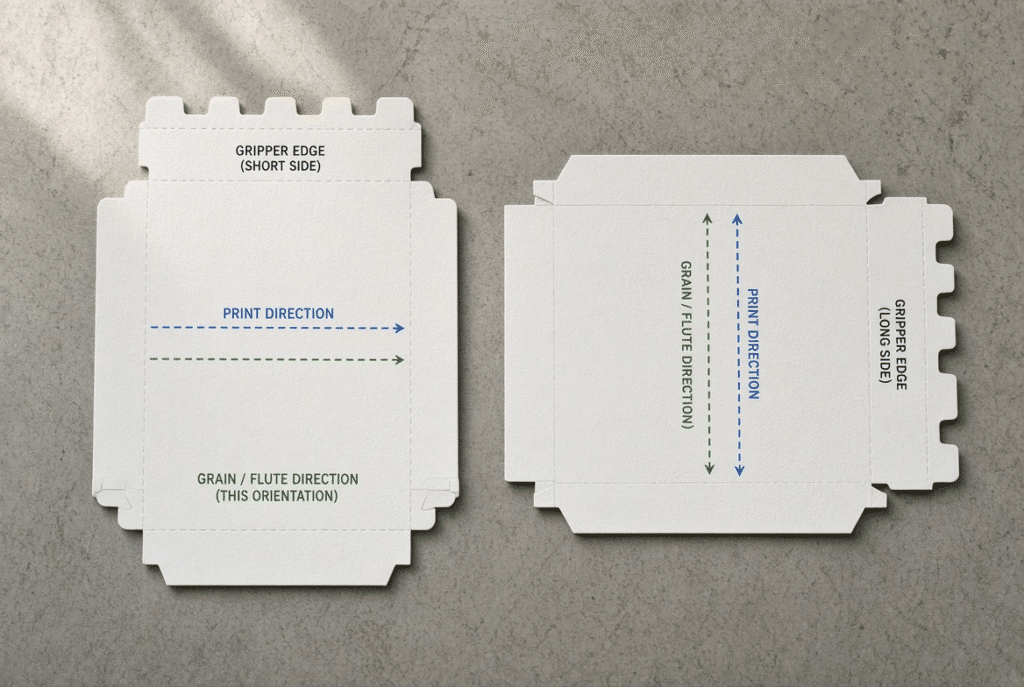
The rotation of the layout will change the gripper edge, grain / flute direction, print direction, waste / feeding behaviour. A layout that seems to fit in one direction on the surface may not be appropriate when taking into account the material structure. Test both orientations.
Sheet Orientation, Die Layout and Registration
Machine sizing includes the orientation of the sheet. It may be dimensionally correct, but needs to be laid differently for the grain, flute, print, folding, feeding or registering.
Flat Product Layout Versus Assembled Product Size
Folding cartons and corrugated packages are measured as flat blanks. Add all panels, flaps, glue areas, slots, crease and perforations. Do not size the machine based solely on the final assembled size of the box.
Multi-Up Layouts Across the Sheet
Angular errors or errors in the small sheet position can be multiplied with multiple product layouts. Apparent registration offsets may be different for the first and last blank across a large sheet. Look at product positioning throughout the entire die pattern.
Print, Grain and Flute Direction
A layout can be sized correctly but inappropriate due to orientation of printed sheets, paper grain direction or corrugated flute direction. These factors impact folding, stiffness, feeding and end product performance. Discuss the effectiveness of layout and the behaviour of materials simultaneously.
Minimum Sheet Size Matters Too
The size of the largest and smallest sheets that the plant is to process should be taken into account in selecting the machine. A machine that is the right size for large sheets may not be the best machine for optimum control and/or layout for small products.
Feeder and Registration Control on Small Sheets
Feeder, gauge and delivery settings will vary in small sheet cases. The separation, transportation and registration of the sheet should be done in a consistent manner. You’ll find that the D800S states that it can print a minimum sheet size of 300 × 180 mm – check against any existing documentation and your own material range.
Small Product Layout and Waste
If the layout of the smaller sheet or product is not optimised, then there may be more edge waste or fewer products per sheet. Size machine for productive, not just acceptable output.
Testing the Smallest Profitable Job
Use the smallest representative job in a machine trial. Verify feeder stability, registration, die-cutting quality, feeder and operator handling. Test the machine over the actual life of its work on the plant.
Common Mistakes When Reading Die-Cutter Specifications
Assuming Maximum Sheet Size Equals Die Size
This assumption often results in an oversized die, a short gripper clearance or a product configuration that will not produce a stable product. Please refer to the maximum die cutting area drawing at all times.
Treating the Maximum Area as a Recommended Production Layout
Running at the extreme end of the boundary leaves little margin for margin registration, variation of material, edge stability and clearance of tools. Verify the suggested practical operating margin provided by the supplier.
Ignoring Minimum Sheet Size
Small sheets pose individual feeding, registration, and delivery issues. Only the largest product is being served by a machine chosen just for that product.
Confusing “Mouth Size” with Gripper Margin
The term “mouth size” could be a term used by the supplier. Don’t assume that it means “gripper margin”, without confirmation of technical definition, direction and sheet handling.
Comparing Different Manufacturers’ Numbers Without Definitions
There are instances where one supplier is specifying the size of the sheet at the feeder, and another supplier is specifying the size of the die area at the die boundary. Ask questions about the drawings, definitions before ranking machines by dimension.
How to Confirm Whether Your Die Layout Fits
Prepare the Complete Flat Layout
Cover all cuts, creases, perforations, internal openings, glue flaps and all waste areas and spacing between products in the product blank. The layout should be to scale and not a simplified outline.
Mark the Sheet References
Mark the position of the gripper edge, front gauge edge, side-gauge edge, direction of print, direction of flutes or grain and any registration marks. Verify these reference edges with the machine supplier.
Compare Against the Official Machine Drawing
Follow manufacturer’s sheet-size, die-area, die-board and installation drawings. Never use catalogue numbers to determine usable area. Request the supplier to note where the proposed die is to be located on the drawing.
Test with Actual Material and Tooling
Do a representative trial with the correct sheet, die, tooling and target speed. Assess feeding, registration, cut quality, creasing, removal and delivery of waste. One dimensional is not production validation.
What Buyers Should Ask the Machine Supplier
Questions About Sheet and Die Dimensions
- What are the maximum and minimum sheet sizes?
- What is the maximum die-cutting size?
- Are the dimensions measured in the machine direction and cross-machine direction?
- Does the cutting-area figure include gripper clearance?
- What is the die-board size?
- What is the definition of “mouth size”?
- What edge is used for gripping and registration?
Questions About Materials
- Which paperboard thicknesses have been tested?
- Which corrugated board thicknesses and flute structures are supported?
- How does the machine handle warp and curl?
- What speed was achieved with the buyer’s material?
- Can coated, laminated or stiff sheets be tested?
Questions About Layout and Application Trials
- Can the supplier review the actual flat blank?
- Can the supplier test the actual die?
- What practical edge clearance is recommended?
- Can the product be run in more than one orientation?
- What registration result was achieved?
- What waste-removal and delivery setup is required?
- Which functions are standard or optional?
Request Written Confirmation
Obtain the final sheet size, die area, gripper interpretation, material range, tooling and trial results in a technical agreement or quotation. This protects both parties from different interpretations of catalogue terminology.
Using the D800S as a Specification Example
Current technical material for the D800S lists:
- Maximum sheet size: 800 × 620 mm
- Maximum die-cutting size: 800 × 615 mm
- Minimum sheet size: 300 × 180 mm
- Listed minimum mouth size: 8 mm
These values must be verified against the latest official documentation before any purchasing decision.
How to Read the D800S Dimensions
The 800 × 620 mm figure describes the maximum sheet envelope. The 800 × 615 mm figure describes the listed maximum die-cutting envelope. Treat the two numbers as separate technical limits, not interchangeable values.
What the D800S Buyer Must Confirm
Confirm the exact gripper or mouth-size definition, die-board dimensions, product layout, material range, front and side reference edges, sheet orientation, corrugated or paperboard compatibility, target production speed and actual sample result.
How to Submit an Application for Review
Send DAIS the sheet drawings, flat product layouts, material and thickness, print direction, grain or flute direction, die drawings, required number of products per sheet, target speed, and folding, gluing and waste-removal requirements. A technical review or machine trial is the correct way to confirm application fit.
Final Checklist for Comparing Sheet and Die-Cutting Size
- Record the largest regular sheet
- Record the smallest profitable sheet
- Measure the complete flat product layout
- Identify the gripper edge
- Confirm front and side registration edges
- Check maximum die-cutting area
- Review die-board size and tooling clearance
- Test both product orientations
- Consider grain or flute direction
- Check material flatness and stiffness
- Test actual tooling and samples
- Review production speed
- Obtain written supplier confirmation
Final Guidance: Buy for the Usable Production Area
Maximum sheet size tells you what the machine can feed and transport. Maximum die-cutting size tells you how much of that sheet can be used for the die operation. Neither number should be read without gripper, registration, tooling, material and layout context. Select the machine for the usable production envelope that matches your real jobs, then confirm that envelope with drawings and trials before ordering.