

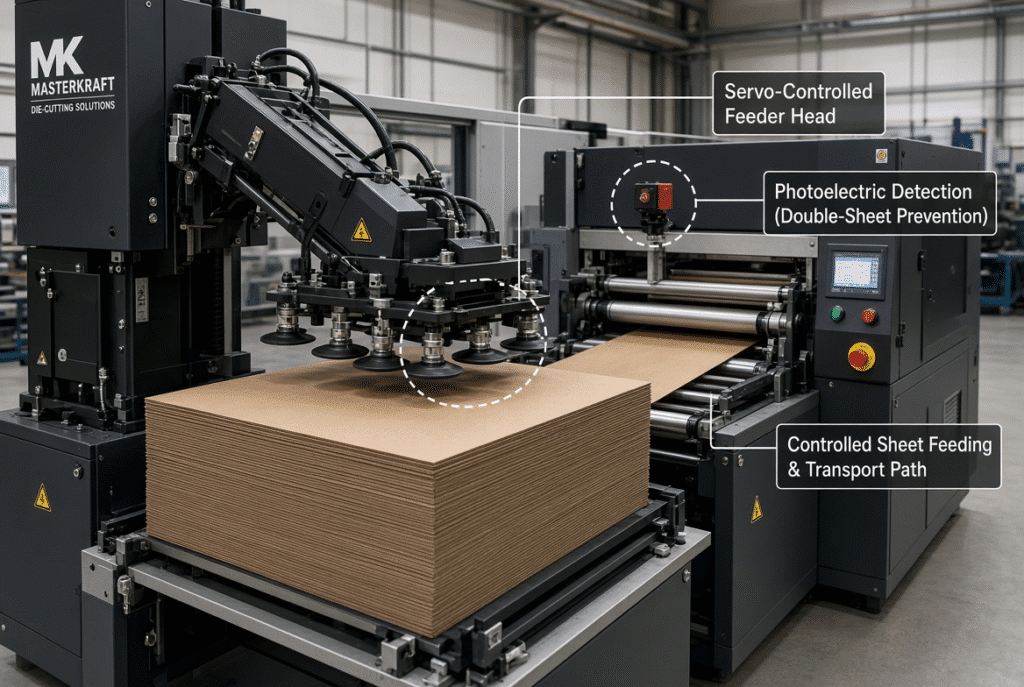
In an automatic platen type die cutting machine, double-sheet detection and servo feeding are used to detect abnormal sheet input and control feeding timing to improve sheet handling. Servo feeding automates the pick-up, transfer and delivery of each sheet with electronic timing and servo driven motion to achieve consistent timing between each sheet. Double-sheet detection monitors to detect overlapping sheets or unexpected thickness that trigger a stop/alert prior to reaching the registration gauges or platen. They both minimize misfeeds, jamming, waste, and operator variation during registration, but they never can replace proper pile preparation, setting up the suction, material condition, and operator attention.
A feeding error is seldom a feeder inconvenience. It can send two sheets into the die, cause damage to the tools, registration change, loss of printed stock and unplanned downtime. Knowing exactly how these systems work, and where they still need an operator to contribute, allows for the plant to operate more reliably.
What Is Servo Feeding in an Automatic Die Cutter?
Servo feeding, which utilizes electronic timing and servo motors to control pickup, transfer and delivery of each sheet, is a controlled sheet-movement system. It does not eliminate a mechanical contact or operator setup. In addition to suction, air assistance, feed wheels, belts, guides and sensors, the servo system helps to ensure that sheets are moved in sync with the machine cycle.
Servo Control of Sheet Timing and Movement
Sheet pick up and sheet forward motion are servo controlled to be synchronized with the machine cycle. If the timing is steady, the sheets will reach the front gauges at regular intervals, with even contact. When a sheet is late, it can impact the gauges unevenly, which can result in a front-to-back registration shift that will be evident when it is printed on a blank. Early arrival can give similar problems or bounce the sheets. These timing swings are reduced by the servo system, but only if the amplitude of the rest of the feeder is sufficiently correct for the material.
Adjustable Feeder Settings for Different Materials
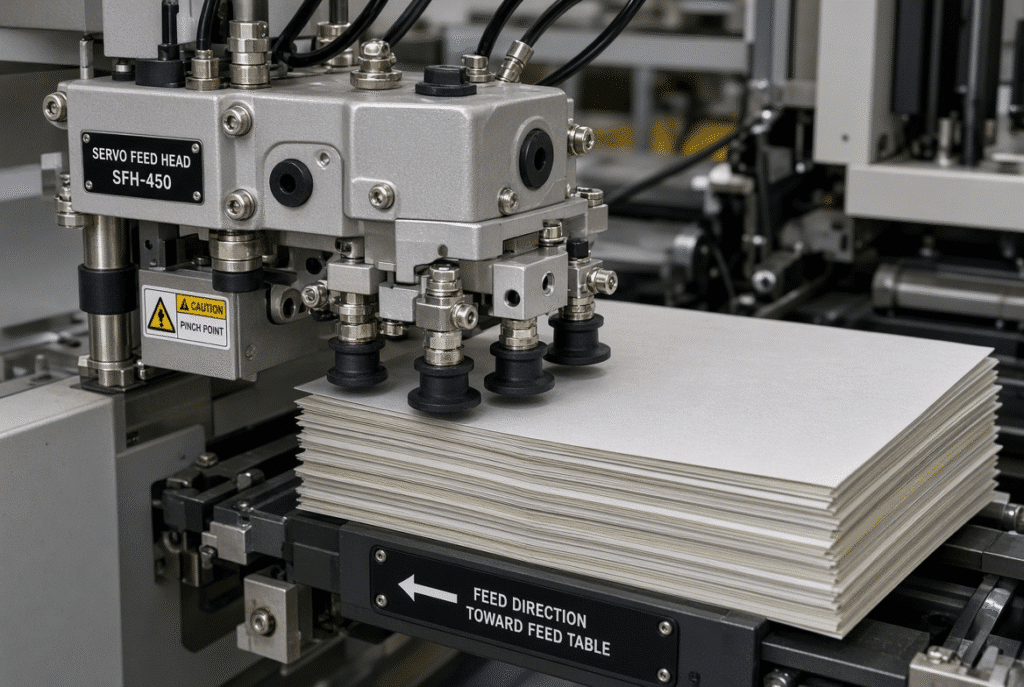
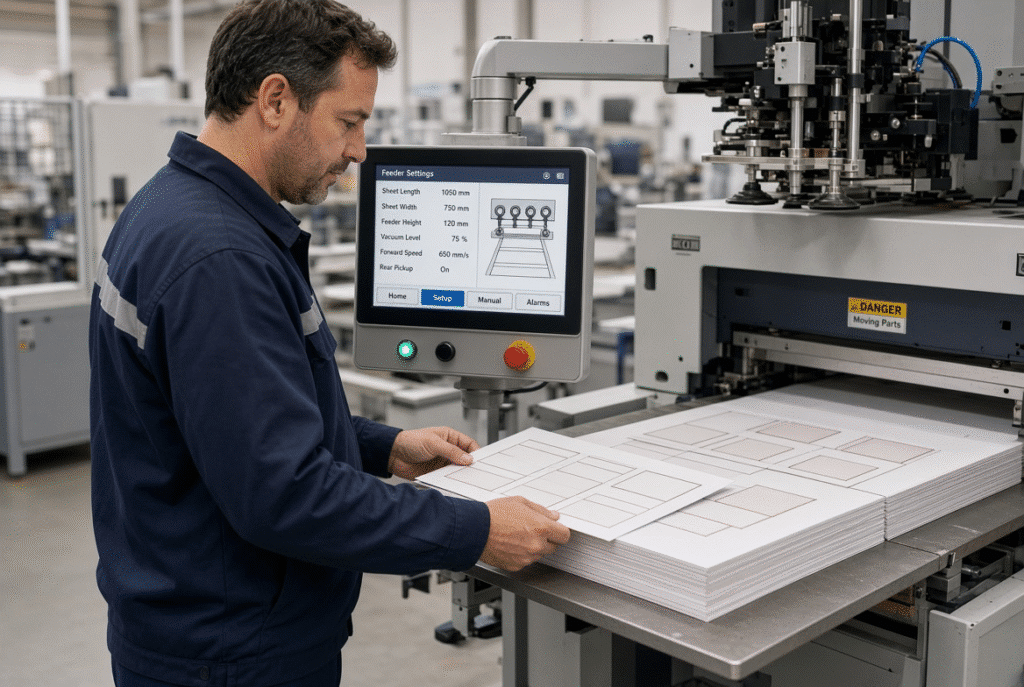
Various properties of the sheet affect feeder behavior, such as sheet weight, thickness, stiffness, coating, curl and surface friction. Lighter paperboard may require less suction and more air assistance, and heavier paperboard or other compatible corrugated material may require stronger suction and a different nozzle height. The suction angle, air volume, feed speed and timing should be adjusted accordingly to the real sheets. There are no universal numerical settings. Operators should run representative sample sheets prior to production, according to machine manual.
Servo Feeding Versus Simple Friction Feeding
A simple friction only feeder uses primarily mechanical contact and timing. Electronic speed and position control via servo control can help to make sheet intervals more predictable. Conditions of feed-wheel, material behaviour and set-up quality remain critical for reliability. The well set-up non-servo system can outperform the poorly adjusted servo feeder. The benefit of servo control seems to emerge when operators utilize it to adjust timing for actual materials in production – not as a form of automatic insurance.
How the Feeder Separates One Sheet from the Pile
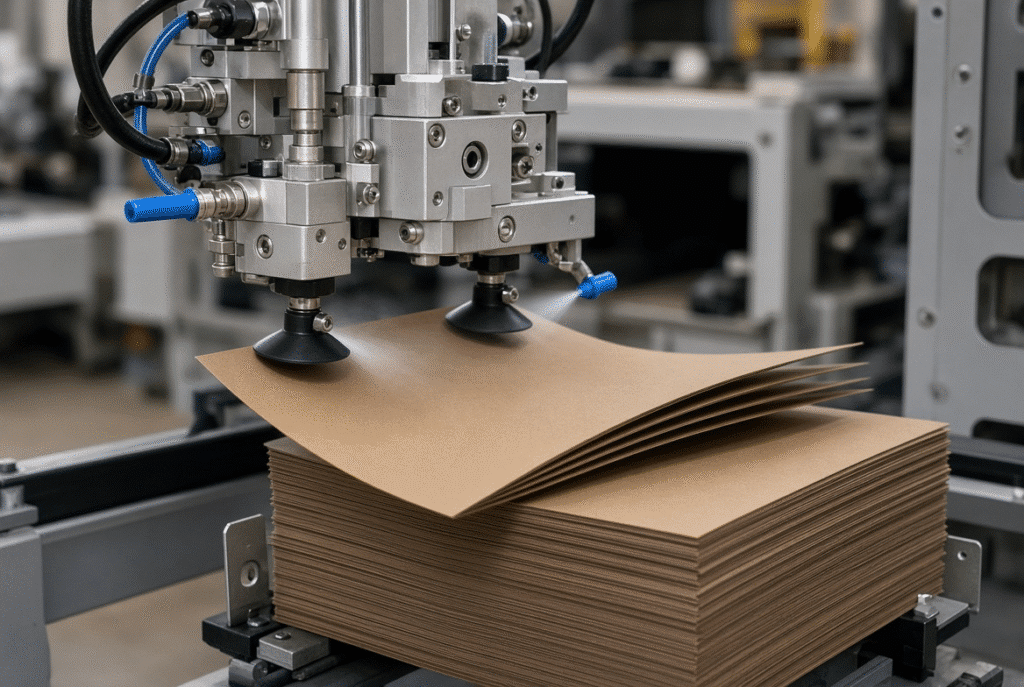
Clean separation is the first step to reliable feeding. The feeder head should only pick up the top sheet of paper, leaving the next one in place. In most cases double feeding occurs due to poor separation even if the servo system and sensors are working.
Suction, Air Assistance and Feeder-Head Adjustment
The top sheet is lifted up by suction nozzles. Air assistance or separation devices are used to help loosen the top layers in order that the next sheet does not follow. The suction need to be strong enough to lift the sheet, but not so strong that it will lift two. Lightly coated stock may be best suited for controlled nozzle height and moderate suction; heavier or slightly warped paperboard may need more suction and/or air volume adjustments. Two-way air assistance (where available) helps maintain stability of the sheet as it leaves the pile.
Pile Alignment and Feed-Pile Height
The feed pile should be even, straight and placed within the machine’s working height. A misaligned pile, either because it is uneven or because it is tilted, will alter the pickup angle and may result in an intermittent loss of suction or in sheets being pulled unevenly. Maximum pile-height specifications do not necessarily guarantee the same feeding behaviour in each substrate. At the beginning of each job and in long runs, operators should inspect piles for side alignment and flatness.
Static, Curl and Surface Friction
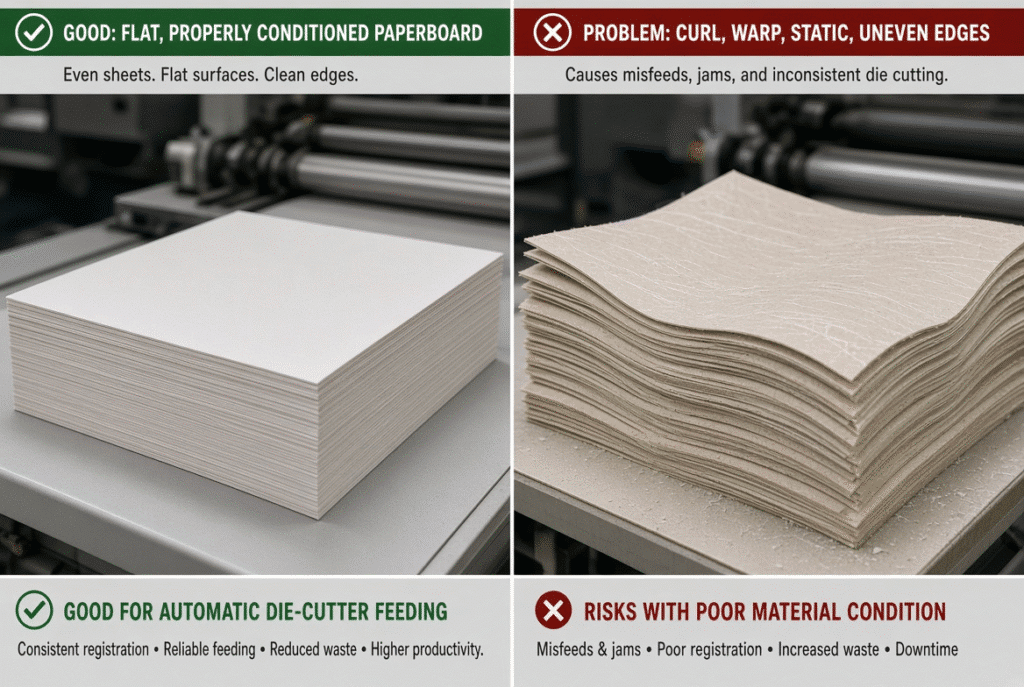
Static electricity can cause sheets to stick together so they can lift together. The sheet is unevenly brought into contact with the feeder head by the curl. Coated or laminated surfaces alter the friction and either aid or obstruct in clean release. All three are affected by moisture content and stored conditions. Changing electronic settings is rarely effective if material condition and pile preparation are not properly controlled.
What Is Double-Sheet Detection?
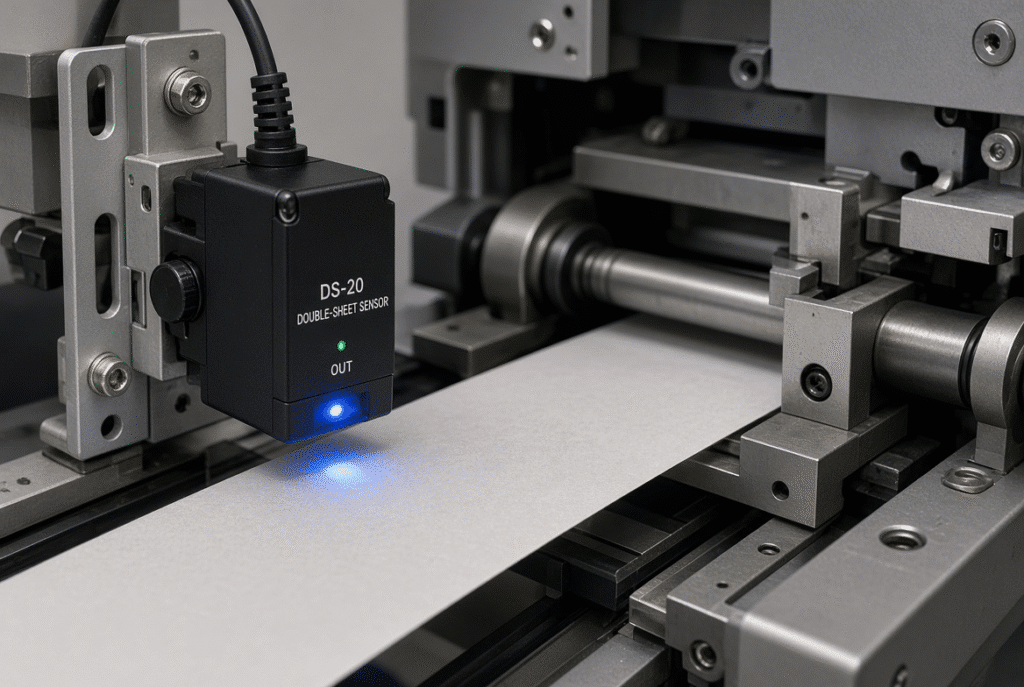
The double sheet detection is one of the monitoring functions that can detect when two or more sheets, or abnormal sheet thickness enters the feed path. The majority of modern automatic die cutters are equipped with a photoelectric sensor and in some cases, thickness sensing and/or contact sensing are also incorporated. The system is not designed to correct all feeding situations.
Why Two Sheets Entering Together Is a Serious Problem
A double sheet that extends to the platen may result in incomplete cuts, crushing, misregistration and greater pressure on the die and cutting plate. Damage to tooling can occur, as can stress to the grippers or transport parts, with consequent disruption of the delivery pile. A single double-feed occurrence on printed folding-carton paper will often result in scrap on an entire printed sheet, plus the time to clear the machine and re-sheet it.
How Sensors Identify Abnormal Sheet Entry
In a photoelectric machine, the light to be detected is normally an interruption in the light path or change in sheet thickness as it proceeds through a stationary point. If the sensor detects a condition that falls beyond the normal one sheet range, it alerts the control system. The timing and detection threshold of the machine response will vary according to machine configuration and should be validated to the manufacturer’s specifications. Sensors only sense abnormal condition, they do not diagnose why this condition has occurred.
What Happens After a Double-Sheet Detection Alarm
The system can stop the feeder, alarm or prevent the abnormal sheet from going ahead into the registration area, depending on the machine set-up. The operator is required to stop safely, find the cause, remove the sheets and correct the condition before restarting the machine as outlined in the machine’s documented procedure. To reset the alarm without making any change in the material and feeder setting is to delay the next stop.
How Servo Feeding and Double-Sheet Detection Work Together
The movement and timing of the sheet are controlled by servo feeding. Double-sheet detection will determine if the desired single-sheet condition is being met. There are two systems, one for propulsion, the other which gives a protective check. The sequence of the practical is:
- The top one is picked up by the feeder.
- A servo system is used to control the timing and movement.
- Abnormal sheet entry sensor checks.
- Correct sheet is passed on to registration.
- If feeding is abnormal, an alert or stop will occur as per machine setting.
Preventing Feeding Errors Before Registration
This will help to prevent the sheet from overlapping or being skewed before it hits either the front or side guages, which will prevent inaccuracy in registration. If a double sheet or angled sheet is used, it can cause a false gauge contact and result in a misregistered die cut, which can only be detected after the platen cycle.
Reducing Jams and Tooling Risk
Multiple sheets or unstable stacks are not in the platen area in the early stages. This minimises the risk of jamming, over pressure to the die and printed sheets being damaged. Detection reduces risk, but does not eliminate all mechanical problems that still may occur due to worn parts or incorrect settings.
Supporting Stable Production at Higher Speeds
As the speed gets higher, the timing and early detection get more important. Still, running speed will be practical for any given sheet size, material characteristics, die layout, feeder arrangement, and continual operator oversight. Maximum rated speed is not automatically allowed on all substrates using servo feeding.
Feeding Errors That These Systems Help Reduce
Double Feeding
Two-sheet entry can be minimised through the use of separation settings and detection systems. Common contributors include static, smooth coatings, too much pile pressure and wrong suction. Instead of increasing the sensitivity of the detection, operators should check material and pile preparation first.
Missed Sheets and Irregular Sheet Spacing
Missed picks or uneven spacing are due to incorrect suction, feeder timing, sheet curl, lack of air assistance or worn contact surfaces. Irregular intervals cause registration timing to be off and cause more stops.
Skewed Sheet Entry
A sheet may be fed into the machine at an angle due to misaligned guides, worn feed wheels, a tilted pile of sheets, or uneven pickup. When we start moving the sheet, it is too unstable to be straightened by servo control. Feeder-head alignment, sheet supports and material condition need to be verified.
Sheet Jams Near the Registration Area
If the sheets are not placed on the front or side gauges in the right place, whether they are late or early, or overlap or are out of alignment, the sheet will not settle properly. Some of these events can be avoided by double-sheet detection, yet the condition of the gauges and sheet quality need to be checked. It is important to stop safely and inspect qualified if jams occur repeatedly in the same area.
Registration Variation
Variations in sheet timing and sheet position directly relate to registration variation when printing to a die. Servo control enhances the repeatability of arrival but the registration, sheet squareness, gauge condition and material stability are still critical.
Why Feeding Errors Still Occur Despite Servo Control and Sensors
Automation provides better control, but not the elimination of physical variation in paperboard and packaging materials.
Material Variation
Separation and transport are influenced by thickness, density, moisture, curl, warp, surface coating, lamination, static, edge quality and flute structure (for compatible corrugated). One setting can work for one batch of candy and wreak havoc the next.
Incorrect or Unstable Settings
Even if the hardware is correct, the error may occur due to the following reasons: Incorrect suction level, incorrect air volume, incorrect servo timing, incorrect feed speed, incorrect pile height, incorrect guide position, incorrect sensor sensitivity etc. The best way to make one setting at a time and record the results.
Worn or Contaminated Components
Dust, paper fibers, and adhesive residue is collected by feed wheels, transport belts, suction nozzles, sensors, guides, brushes, and air passages. Wear changes affect contact force and detection performance. These components are kept within specification by following the machine’s preventive-maintenance schedule.
Poor Pile Preparation
Before the servo system or sensors can stabilize the sheet, if there is a problem with feeding the sheet due to a badly aligned, compressed, uneven or static-charged pile. The best control is correct pile preparation.
How to Set Up Servo Feeding for a New Job
Any generic sequence is not used unless the operating manual or trained personnel is used. These are the steps you can take practically.
Confirm Material and Sheet Information
Check the sheet size, material type, thickness, surface coating or lamination, sheet weight, flatness, curl or warp, pile condition and target speed before touching the settings. The feeder should not be designed for nominal dimensions instead it should be designed for actual material.
Adjust Feeder Head and Separation
Check the position and height of suction nozzles, suction level, air assistance and feeder-head height. Test sheets and check edge stability, single sheet pickup and sheet spacing. Don’t make abrupt jumps.
Set Servo Timing and Transport
Coordinate servo timing with the machine cycle to ensure smooth feeding of sheets to the machine without being fed too far forward, too far back, or with too great of a speed change. Check transport stability at a controlled speed before increasing output.
Verify Double-Sheet Detection
Perform the checking of the detection system as per machine procedure. Verify that it is aware of the intended abnormal condition but does not produce false alarms. Avoid unnecessary stops by not disabling the system.
Approve Samples Before Full-Speed Production
Test controlled samples and single sheet feeding, sheet spacing, double sheet detection response, front registration, side registration, die cut position, delivery pile alignment, material damage, and overall stability. Record the approved settings for repeat jobs.
Troubleshooting Servo Feeder and Double-Sheet Detection Problems
| Visible Symptom | Possible Cause | First Operator Check | Escalation Point |
| Double-sheet alarm every cycle | Sensitivity too high, sensor contamination, wrong material thickness setting, overlapping sheets from poor separation | Clean sensor, verify material thickness, check suction and air assistance | Qualified technician for sensor calibration or mechanical inspection |
| Alarm only on one material batch | Thickness variation, coating, static, curl, moisture | Compare with known-good batch, check storage conditions and pile preparation | Material supplier or process engineer |
| Missed sheets or irregular pickup | Suction too low, nozzle position, pile height, worn wheels, timing | Adjust suction and air, check nozzle height and pile level | Maintenance for worn components |
| Sheets arriving skewed | Feeder-head alignment, unequal suction, edge damage, guide position, transport wheels | Check pile alignment, guides, and feed-wheel condition | Mechanical alignment by technician |
| Repeated jams or abnormal noise | Mechanical obstruction, worn parts, incorrect timing, sensor bypass attempt | Safe stop, clear path, inspect for foreign objects | Immediate qualified technical inspection—do not continue running |
Double-Sheet Alarm on Every Cycle
The usual suspects include incorrect detection sensitivity, sensor position, material thickness setting, overlapping sheets, and a contaminated sensor. Prior to a repeated reset of the alarm, inspect the material and sensor condition.
Double-Sheet Alarm Only on Certain Materials
Changes in thickness, coating, static, moisture, and surface friction, affect the separation and detection behavior. It turns out that it was the sensor that was functioning properly, but it just required a different setup. Test it under control with a known-good batch and verify machine’s acceptable material range.
Missed Sheets or Irregular Pickup
The most important variables are suction, air assistance, nozzle position, pile height, feeder timing, material flatness, and worn contact parts. Check the effect of changes in only one setting at a time.
Sheets Arriving Skewed
They all contribute to feeder-head alignment, unequal suction, sheet-edge damage, pile alignment, transport wheels and support-table condition. Front and side gauge issues are almost always a result of skewed entry.
Repeated Jams or Abnormal Noise
If jamming occurs repeatedly, resistance is abnormal, vibration, noise or mechanical impact occurs, it must be carried out immediately under the premise of safety, and it is required to have qualified technical inspection. Never accelerate or pass over sensors.
How Feeding Quality Affects Registration and Die-Cutting Output
The sheet needs to be delivered to the registration gauges at the same time, angle and position prior to the start of the die-cutting cycle. Feeding issues, albeit small and insignificant at the feeder, manifest as a quality issue at the platen and delivery.
Feeding Timing and Front-Gauge Contact
Front reference is impacted by early, late or uneven sheet arrival. That makes the difference in contact position, or front to back, in the die, manifest on the finished carton as registration error.
Sheet Separation and Die-Cutting Accuracy
Double sheets, overlapping sheets or poor pickup can lead to misregistration, undercutting, crushing or jamming. A feeding problem can result in artwork being cut off on printed folding carton work.
Feeder Stability and Delivery-Pile Quality
Feeding issues may be evident when sheets are being delivered, such as an unaligned stack, uneven blanks, or crooked sheets. The best method of diagnosing output defects is to follow the pathway of the sheet from feeder to registration, platen to delivery.
What Buyers Should Ask About Servo Feeders and Detection Systems
The word “servo” should not be the only focus point when purchasing a feeding system.
Questions About Servo Feeding
- Which feeder movements do you need to be servo-controlled?
- How do you alter and track speed and timing?
- What are the changes in the system for various sheet sizes, weights and coatings?
- What adjustments with suction and air assistance is there?
- What happens to the curled or warped sheets in the feeder?
- What were the speeds shown for the buyer’s material?
- Where are any successful settings saved for repeat jobs?
Questions About Double-Sheet Detection
- What is the type of detection system used (photoelectric, thickness or other)?
- What is it that it is able to identify?
- What is the location of the sensor in the feed path?
- How to adjust and calibrate sensitivity?
- When alarms are sounded what does the machine do?
- Is it possible to differentiate between normal material variations and actual two-sheet entry?
- How often do they need to be maintained and calibrated?
Request a Material and Tooling Trial
Request a trial with real size paperboard or corrugated, coating or lamination, representative die, production speed, and printed artwork containing registration marks. The reliability of feeding is important and should be assessed in conjunction with the accuracy of the die-cutting and delivery speed.
Using the D800S as a Feeder-System Example
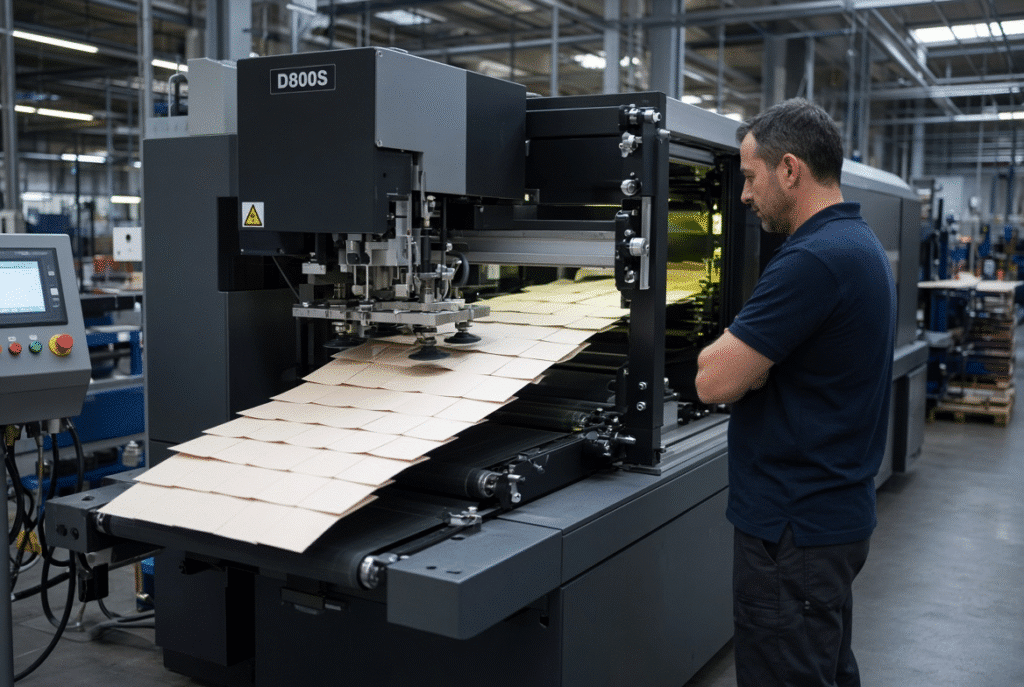
A modern servo-controlled feeder system is the D800S automatic platen die-cutting machine. The technical information available describes a servo-controlled automatic feeder, high speed feeder head from aluminum alloy, adjustable suction angle and height, stream-style overlapping sheet feeding, two-way air assistance, two-way collision detection of feeder heads, and photoelectric detection of double sheets during transportation. These features help pick up, time, separate, and transport sheets consistently and detect any abnormal conditions early. Always check the configuration at the end with approved machine specification.
What the D800S Feeder Features Are Intended to Support
The functions listed are designed to facilitate single-sheet pick-up, timing integrity, separation reliability, transport stability and operator monitoring. They minimize risk and stabilize production, but they cannot overcome all feeding anomalies due to material variation and/or improper setup.
How Buyers Should Confirm D800S Feeding Performance
Representative sheet samples, material thickness, coating data, curl or warp condition, target speed and production requirements must be provided by the prospective buyer to DAIS. DAIS can then validate the end feeder configuration and if suitable, show performance with a representative machine trial including registering and delivery performance.
Final Checklist for Reliable Automatic Die-Cutter Feeding
- Verify dimensions, thickness, coating and surface finish.
- Make sure to make a nice flat, even feed pile.
- Inspect for curl, warp, moisture and static.
- Fine-tune feeder head, suction and air assistance.
- Adjust the timing and transport parameters of the servo.
- Examine feed wheels, belts and guides.
- Check double-sheet detection response.
- Clean and check sensors.
- Pilot controlled samples in the moderate speed range.
- Register front and side.
- Check the accuracy of die-cutting and delivery.
- Write down the settings you have approved for the job.
- Rise repeated alarms, jams, or unusual noise to qualified technicians.
Final Guidance: Automation Reduces Risk, It Does Not Replace Setup
Servo feeding allows for better control of sheet timing and movement. Double-sheet detection is a valuable tool for detecting abnormal feeding before it might affect production or tooling. Disciplined operator practice, accurate preparation of materials, the set-up of the feeder, condition of the sensors, and transport components, as well as accurate registration, continue to be important factors to consider in achieving reliable performance. Combined, these features result in consistent sheet handling and improved usable output from these automatic die cutters.
If packaging plants consider their own materials for evaluation, they should contact DAIS with their sheet samples and production requirements to match the feeder configuration with actual production conditions.